


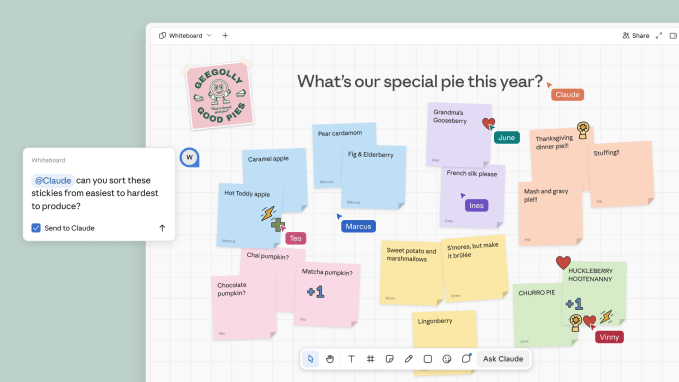
Anthropic announced new workplace features on Tuesday, including Claude Meetings, which brings Claude into video calls to begin working on tasks while participants are still talking. The company also unveiled Claude Whiteboards and Claude Sheets.
The launch of Anthropic’s new productivity-focused features comes just a few weeks after OpenAI unveiled a series of workplace tools that allow users to collaborate with ChatGPT to do things like visualize company information and create presentations, as both companies compete to turn their products into office suites of sorts to take on Microsoft and Google. Meta is also joining the competition with its Muse AI agent, which can build mini-apps on the fly to help users complete specific tasks.
With Claude Meetings, teams can add Claude to a video call as a visible participant. Claude then follows the conversation and gets to work on tasks in real time. As participants talk, it can draft the plan being discussed, map out a timeline on a whiteboard, answer questions in the meeting chat, and access connected work apps to retrieve information, such as last year’s figures. After the call, the meeting notes, action items, and other materials Claude created are available in claude.ai.
The work that comes out of a meeting usually starts after everyone hangs up, but with this new feature, teams can turn discussions into actions in real time, Anthropic says.
Claude identifies itself as a meeting participant and posts a notice in the meeting chat. It won’t join calls with external guests unless authorized by an admin, and will automatically leave if an external guest joins.
Claude Meetings is launching in beta on Team and Enterprise plans. At launch, it works with Google Meet, with support for additional plans expected to follow.

As for Claude Whiteboards, Anthropic describes the feature as a collaborative board where teams can talk through a plan and have Claude turn it into an organized visual workspace with timelines and deadlines.
The company notes that many people already brainstorm with Claude, but that in order to share their results with others, they would have to copy-paste them somewhere else. Now, a team can work directly with Claude on the same board in real time.
When the brainstorm is done, Claude can turn the board into a doc or a slide deck. Additionally, Whiteboards also work inside Claude Meetings, so the board builds while people talk, Anthropic says.
Claude Whiteboards is available in beta on paid plans, on web, desktop, and mobile.
The company also launched Claude Sheets, which lets teams create and collaboratively edit spreadsheets with Claude. A team can ask it to build a campaign tracker or hiring budget, and Claude will then generate a working spreadsheet.

Anthropic says Claude handles the initial setup of trackers and budgets, while allowing teams to continue refining and updating the same spreadsheet. Each spreadsheet can include multiple tabs, formulas, formatting, and dropdown menus. Claude also makes edits directly in cells alongside the team, and outlines each change so users can see what it did.
Claude Sheets is available in beta on paid plans, on web, desktop and mobile.
Anthropic also announced that Claude Data, formerly known as Claude Dashboards, is now generally available. The feature connects Claude to systems that companies use to keep their numbers, like a data warehouse or CRM. Users can ask questions, and Claude responds with dashboards, written data stories, or narrated videos.
Additionally, the company announced interactive connectors that open the full version of apps like Adobe, Atlassian, and HubSpot inside Claude. Anthropic notes that teams can now open these apps directly alongside their Claude conversations and ask the assistant to work within them, essentially bringing existing workflows into the same workspace.
When you purchase through links in our articles, we may earn a small commission. This doesn’t affect our editorial independence.













Leave a comment